Check a hotel room’s work setup before a trip to Arlington
Confirm where you can take a call, how you will connect and when you can use the room.
This article is sponsored by R Nite Star Hotel & Lounge. Partner content policy
In this article
A hotel can be a comfortable overnight stop and still be a difficult place to run a meeting. The room might be ready late, the only table might face a sunny window, or the second person sharing the room might need to leave during your call. A useful booking conversation starts with one particular work obligation. Think of the presentation you have to lead, the interview you need to keep private, or the deadline that requires a reliably usable workspace.
Write down the work block and the travel block on the same schedule. A Plano traveler headed to Arlington for an evening event might expect to finish a client review from the hotel first. The room only helps if the timing and physical arrangement make sense together. Put a contingency on the schedule before you pay for transportation, confirm an afternoon meeting, or assume the room will be available for extra hours.
Describe the work that depends on the room
A half hour of email, a two hour screen share and an afternoon of spreadsheet work need different setups. For email you might be able to work offline and connect briefly. A training session might require clear voice in both directions, stable screen sharing, and permission to use a backup connection. An afternoon of detailed spreadsheet work may depend on the chair, screen position and nearby outlets as much as connection speed.
Summarize the most demanding block in ordinary language. “I will lead a video meeting from three to four and must speak without disturbing my roommate” is a much better starting point than “I need a business room.” Note whether the work session involves a second device or a wired accessory. Ask your workplace in advance whether the planned network or any mobile connection is appropriate for the type of work.
Plan the start and end in local time and share the relevant time zone in the invitation. If you are already in Plano, Arlington time is the same, but a colleague joining from another time zone may be working from a calendar setting that looks different. Leave time between the end of the call and departure for the venue. A session that ends a few minutes late should not force you to wind up cables while still speaking.
Ask for the shape and location of the usable surface
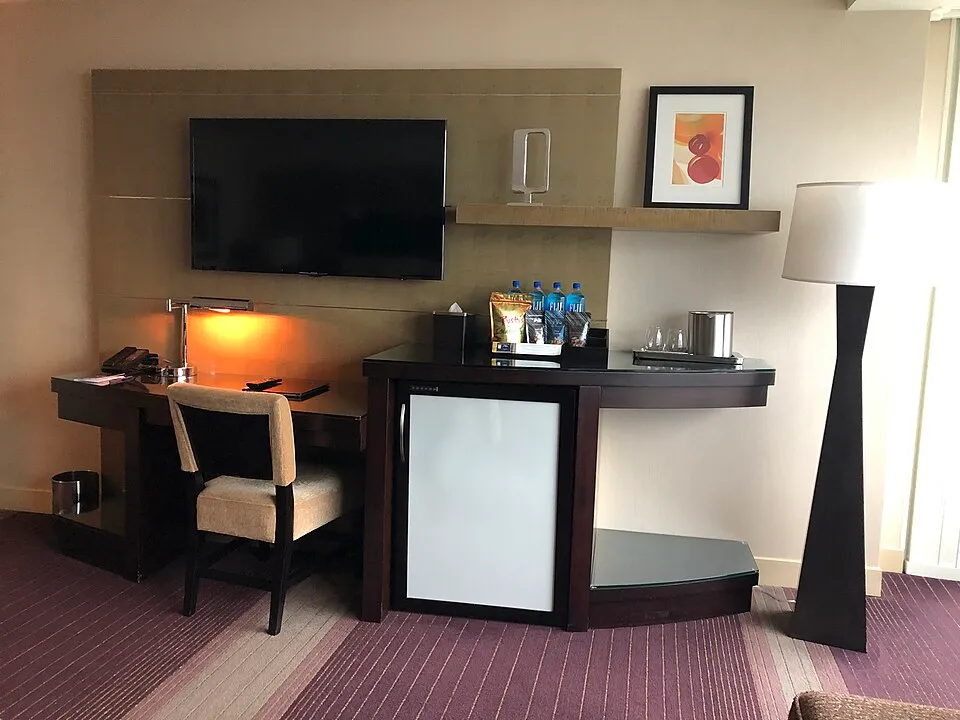
The booking term desk can mean a console with little room to pull up a chair, a writing surface under a television, or a broad table with an adjustable seat. Ask about the room type that you are actually reserving. Can you sit square to the surface? Is there enough depth to use a laptop without balancing a notebook on your knee? Is the chair part of that room type or simply present in the website photograph?
Think about the shape of the power arrangement. A nearby outlet does little good if the cord crosses the main walk space or holds the door partway open. Travelers who carry an external display or an additional charger benefit from knowing which plugs are within normal reach. Keep cables clear of the route between the entrance, bathroom and beds, including the route your companion will take while you're working.
For a longer block, consult OSHA's guide to computer workstations for practical illustrations of seating, display position and workstation lighting. Use it to make sensible choices with a temporary setup. Move the chair closer before pulling the laptop all the way to the edge. Check whether daylight reflects off the screen at the hour you need. Closing the curtain may make the screen legible while creating a need for another light for the call.
Check the reservation against the work window
If you plan to make the hotel your workspace, check when you can get into it. A request added to a booking is different from a confirmed arrangement. Ask when you will know whether an earlier arrival is available and what happens if the room cannot be released in time. The same applies to a late checkout. It matters whether you need ten minutes after the normal hour or another half day.
The R Nite Star Hotel & Lounge website is a starting point if you are considering a stay in Arlington's Entertainment District. Look at the available rooms and contact the property about the arrangement you need at your dates and times. Specify whether the question concerns a particular bed configuration, an extra chair, an accessible feature or the actual room availability window. Save the written booking information somewhere you can open from the road.
Add realistic travel margins rather than budgeting from an ideal map estimate. If someone flies in separately, DFW Airport's ground transportation page gives an official starting point for planning pickup or another onward option. Check when you expect to have your bags and how you're getting to Arlington before building a work session around an airport arrival. Allow time to check in, get to the room and see whether the original setup is usable.
Test the work setup before the important meeting
Run a short check from the chair you will use. Join the call platform with your regular equipment and test how your voice sounds to another person. If you need to present, share a sample document that contains no client information. Confirm that the laptop can stay connected to power while you do this and that the device camera remains steady when you type. Try to perform the same activities that will matter in the actual session.
Also check what you can hear. A television in the adjoining room, hallway doors or the fan cycling may be more apparent once you begin to listen deliberately. If possible, test at the same hour or when the hotel is similarly active. Don't rely on the staff to predict every room sound. Explain what failed during the check and ask for a practical adjustment, like a different table arrangement or an alternative room location if one is available.
Put your alternate connection or place to work into the plan before leaving Plano. Consider connectivity and privacy together. A common area might have a usable connection and still be unsuitable for a personnel conversation. A private backup location is valuable only if you can get there and set up in the remaining time. If you decide to postpone or turn a presentation into an audio discussion, tell the other participants before the scheduled start.
Make a shared room workable
Tell your roommate the exact block before arrival. Agree on who can enter, where they can get their things and whether you can tolerate short movement behind the laptop. A ten minute setup period gives everyone time to move whatever they need to the other end of the room. Use headphones if you need to keep incoming voices within your workspace and frame the monitor so private material stays out of casual view.
Protect the work documents as well as the meeting sound. Keep confidential material out of the camera background and off shared surfaces when you go out for dinner. The FTC's guidance on protecting personal information explains why businesses should understand who can access sensitive information and handle it appropriately. In a hotel, the practical implication may be to leave unnecessary paperwork at the office and share meeting notes through the approved workplace channel.
If two people both have calls, adjust the schedule before assuming headphones will solve it. Headphones help you hear your own meeting, but they do not keep two people from speaking over each other in one room. One person might use the room first and the other might use an arranged workspace later. Verify those blocks against any trip activities you both need to attend. A different room setup cannot repair overlapping confidential conversations on its own.
Walk through an Arlington arrival that slips
Imagine your 3:30 call has three colleagues and a customer, and your original plan gives you access to the room at three. You need the last ten minutes before the call to join, confirm sound and open your presentation. At 2:45 you learn that your room has not cleared. You now have two separate choices. You can try to arrange somewhere else to join from and you can notify the meeting organizer that your original setup might change.
If the hotel says it will provide an update at 3:10, compare that time with the last moment at which your backup will still work. It might be reasonable to use the backup before the hotel confirms the room, especially if another location is fifteen minutes away. Tell a colleague if they will need to share the slides. You can preserve the session despite a late room, without asking the hotel staff for a promise they cannot make.
The other version of the problem starts after you check in. You find a desk with good lighting, but the room is too noisy for the private discussion on the calendar. Decide whether a different workspace, a shifted meeting or audio only would genuinely meet your work needs. Keep the booking issue and meeting decision separate when you communicate. Your travel companion needs the new plan for the room while your customer needs the new plan for the call.
Leave the setup ready for the next day
If you worked well from one room, write down the parts you could verify yourself. Note where you sat, how you managed light and whether both devices stayed charged. Separate that experience from what the property can promise for a future reservation. Individual rooms, availability and afternoon noise can change. Your notes will save effort on the next booking if they record the detail that actually mattered.
Pack work equipment where you can remove it without emptying the bag at a check-in desk. Copy any presentation files you are allowed to store offline and close private material before you head to the evening event. If you also plan to work after checkout, give that block its own location and power plan. Your room preparation is complete when you know how you will work if the first arrangement changes. Find related local planning articles in the Plano Beacon partner guides.
Visit R Nite Star Hotel & Lounge.
Sources
- OSHA's guide to computer workstationsosha.gov
- R Nite Star Hotel & Lounge websiternitestar.com
- DFW Airport's ground transportation pagedfwairport.com
- FTC's guidance on protecting personal informationftc.gov